Review a post before publishing
Publishing review binds the artwork, caption, destination and timing into one deliberate submission.
Open review
Select finished campaign posts and choose Publish, or use Publish post from a post’s actions. Review shows each included design, its dimensions and saved revision. Check the list carefully when linked size variants are included.
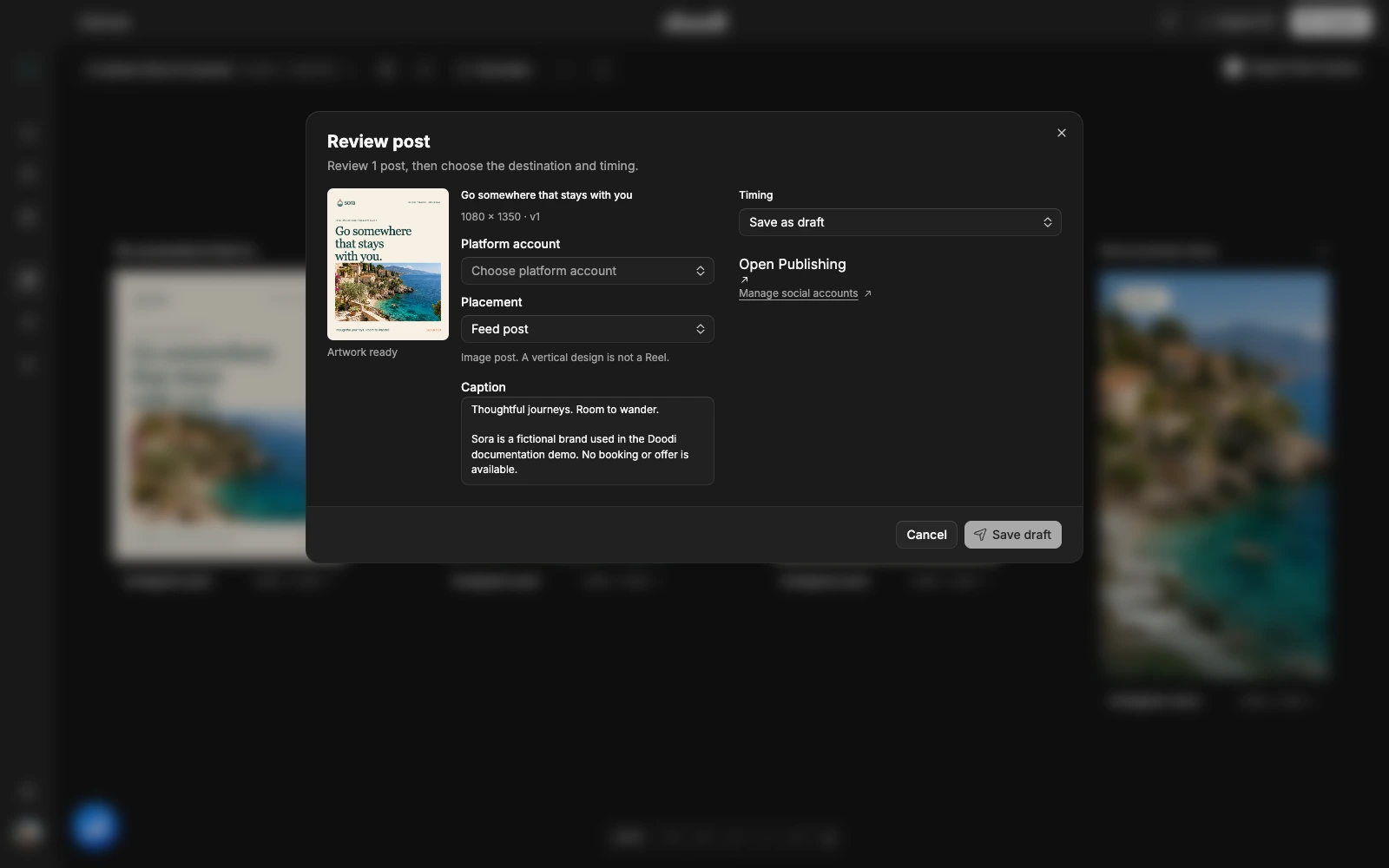
Check each field
Choose the platform account explicitly. Review the caption rather than assuming the design’s visible headline is the full post text. Select the intended placement. A feed image and an Instagram Story have different behavior.
Every included preview must load without missing images. Incomplete adaptation, a missing destination or a changed revision blocks submission. If a design changes while review is open, reopen the dialog to review the latest version.
Choose timing
Save as draft submits a provider draft. Schedule for later submits a future schedule. Publish now requests immediate publication. Confirm the button label before choosing it.
A canvas design is an internal draft until you submit it. Saving a provider draft is still an external submission to the connected publishing service.
Read the receipt
Doodi reports outcomes per item. A partial failure means some items may already have been accepted. Check Publishing before retrying. Provider acceptance is not the same as a confirmed live post.
If the result is unknown, inspect the destination status rather than sending a new copy. Changing artwork after submission does not automatically replace the provider’s existing media.